Tenant Portal
Frequently Asked Questions
Have a question? Before submitting a request, check our FAQ — the answer you’re looking for might already be here. This section covers the most common topics related to leasing, maintenance, services, and more.
A – During business hours (Monday to Friday, 8:00 a.m. to 5:00 p.m.), please contact your property manager to obtain a duplicate key.
A – Outside of business hours, contact a locksmith and make sure to notify your property manager of the loss to ensure compliance with the reproduction of “master key” types.
Fees may apply in the event of lost keys.
A – Have you changed the remote control battery?
A – Have you cleaned the air conditioner filter? Refer to the “Repairs and Maintenance – Air Conditioner” section.
If the issue persists, select the appropriate option in the “Repairs and Maintenance – Other” form and provide the requested details.
A – Have you cleaned the air exchanger filter? Refer to the “Repairs and Maintenance – Air Exchanger” section.
A – If the smell seems to be coming from the floor drain next to the hot water tank, you can pour a bit of water directly into the drain.
If the issue persists, select the appropriate option in the “Repairs and Maintenance – Other” form and provide the requested details.
A – Have you cleaned the dishwasher filter? Refer to the “Repairs and Maintenance – Dishwasher” section.
If the issue persists, select the appropriate option in the “Repairs and Maintenance – Appliances” form and provide the requested details.
A – Have you cleaned the range hood filter? Refer to the “Repairs and Maintenance – Range Hood” section.
If the issue persists, select the appropriate option in the “Repairs and Maintenance – Appliances” form and provide the requested details.
A – Have you checked the circuit breakers? Refer to the “Repairs and Maintenance – Electrical Panel” section.
If the issue persists, select the appropriate option in the “Repairs and Maintenance – Electricity” form and provide the requested details.
A – During business hours (Monday to Friday, 8:00 a.m. to 5:00 p.m.), please contact your property manager to obtain a duplicate key.
Outside of business hours, contact a locksmith and make sure to notify your property manager of the loss to ensure compliance with the reproduction of “master key” types.
Fees may apply in the event of lost keys.
A – Check whether the issue is limited to your unit or affects the entire building by visiting Hydro-Québec’s “Info-Pannes” page.
A – If the issue is isolated to your unit and persists, please select the appropriate option in the “Emergency – Power Outage” form and provide the requested details.
* For any other request related to an electrical issue (non-functional outlet, etc.), please select the appropriate option in the “Repairs and Maintenance – Electricity” form and provide the requested details.
A – Check whether the issue is isolated to your unit or affects the entire building. If applicable, shut off your main water valve and avoid using the affected facilities.
A – Select the appropriate option under the “Emergency” category in the request form and provide the necessary details.
A – Contact the authorities if needed, then notify us using the “Emergency” form.
A – Select the appropriate option under the “Leasing” category in the request form and provide the required details.
A – Yes, this allows us to coordinate building access and any necessary services. Please select the appropriate option under the “Leasing” category in the request form and provide the required details.
A – Rent is due on the 1st day of each month.
A – Payments are made by automatic withdrawal. Please refer to your lease or contact the administration through the “Administration – Rent Payment” form for specific details.
A – We issue an RL-31 slip to tenants at the beginning of each year for rental expenses incurred during the reference year for tax purposes. Please contact the administration through the “Administration – RL-31 Slips” form.
A – It’s important to inform us as soon as possible. A payment arrangement may be considered depending on the situation. Please contact the administration through the “Administration – Rent Payment” form.
A – Yes, but any change must be approved by the administration. Please contact the administration through the “Administration – Rent Payment” form.
Each season: open the cover, remove filters, vacuum, rinse with hot water, dry completely, and replace.
Each season: lift cover, remove filters, wash with warm water, dry, and replace to maintain good performance and air quality.
**To be done once a month**
Simply unscrew the piece, clean it with hot water, and put it back in place.
This ensures proper drainage during purging and helps prevent odors, dirty dishes, and the risk of water damage. Regularly clean the rubber gasket around the dishwasher door to remove any food or debris that could prevent it from sealing properly. A sponge and a degreasing cleaner usually do the trick.
Also check that the water valve under the sink is working properly, that there are no leaks, and that the hose running to the dishwasher isn’t kinked.
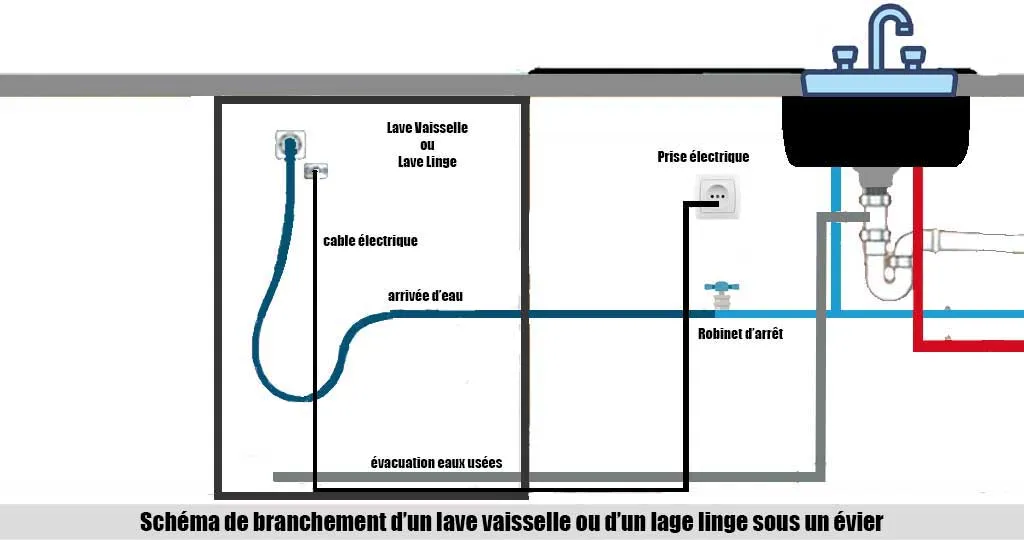
**To be done every three months**
Simply remove the filters, soak them in soapy water, and scrub them gently with a soft brush. Let them dry completely and put them back in place.
**To be done after every use**
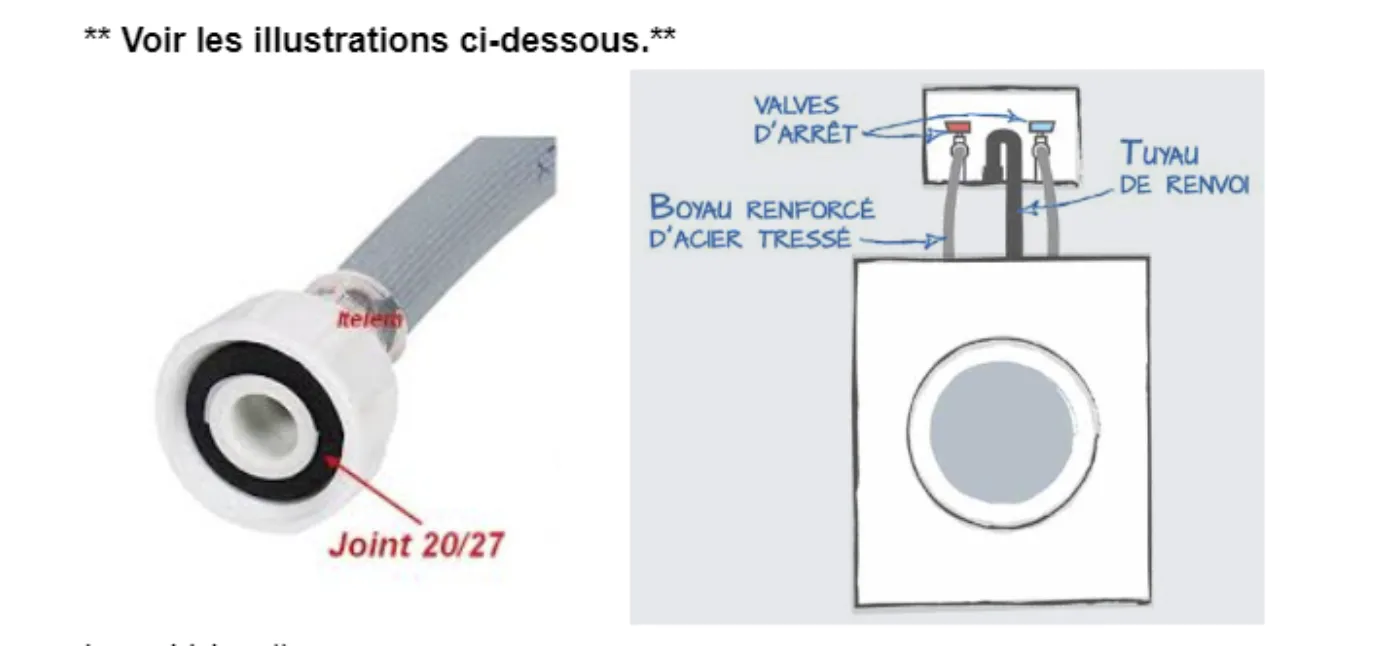
**To prevent water damage, make it a habit to close the shut-off valves located on the wall behind the washer after each laundry cycle.**
When installing washers and dryers, please make sure—before opening the water valves—that all connections on both ends are properly secured, that the washer hose gaskets are in place and in good condition, and that all joints are tightened securely.(We recommend replacing the gaskets at every move-in/move-out and replacing the washer hoses every 5 years.)
The washer’s drain hose must be inserted deep enough into the drain pipe to prevent overflow during the drain cycle. When you open the water valves, it is recommended to run a short wash cycle under supervision to ensure there are no leaks before putting the appliances into use.
For the dryer, it is important to clean the lint filter after every use. Locate the lint filter—usually near the dryer door—pull it upward to remove it, gently remove the lint by hand, and put the filter back in place.
If an electrical outlet is working poorly or no longer works at all, it’s likely that the device you’re trying to plug in requires too much amperage and isn’t compatible with that outlet.
First, unplug anything connected to the outlet in question, then check the breakers in the electrical panel. Open the main panel— all the breakers should be aligned except the one that has tripped. You can refer to the label on the inside of the panel door to identify and match the breaker numbers.
Next, take the breaker that isn’t aligned with the others and push it from right to left. You should feel a small “click”; the breaker should now be reset. If not, check again to see if any other breaker is out of alignment and repeat the same steps.
A – Please refer to your lease and select the appropriate option under the “Administration” form. Provide the necessary details to learn about the applicable regulations.
A – Try to discuss the issue calmly with the person involved. If the problem continues, report it using the “Administration – Neighbour Disturbance” form.
A – Select the “Administration – Service Add-ons or Other” form and describe your request in detail.
Fibre Hybrid 60 Mbps
- Unlimited monthly transfer
- Modem and Wi-Fi router included
- Option to upgrade speed directly with Vidéotron
Upgrade Options
- 500 Mbps: +$30/month
- 940 Mbps: +$40/month
For any issues (connectivity, modem, Wi-Fi), contact:
- Technical support: 1-877-657-5505
- Customer service: 1-888-657-5505
- Email: serviceclient@videotron.com
Possible upgrades to your included package:
For an internet speed upgrade, please contact Residential Customer Service.
- Upgrade to 500 Mbps for $30/month
- Upgrade to 940 Mbps for $40/month
Possible add-ons to your included package: - illico TV service
- Various channel bundles
- HD-4K terminals | recorders available
- Premium channels available such as Super Écran, Disney Channels, etc.
- And more…
Other services:
- Residential phone line
Mobile plans
Add-ons or upgrades are billed directly to the tenant’s personal account and are not managed by the building manager. Our Customer Service agents will be happy to offer you several options tailored to your specific needs.
Technical support
- illico device won’t turn on or displays an error message
- Remote control not working
- Mosaic or “snow” on screen, image loss
- Image freezing on screen
- Sound issues
Other technical problems
1-877-657-5505
assistance@videotron.ca
Residential Customer Service – Resident Services
-
New customer and installation
-
Adding additional services
-
Billing questions
-
Moving, disconnection, or death
Residents leaving the building must keep their device(s). Otherwise, they must return them to a Vidéotron store.
1-888-657-5505
serviceclient@videotron.com
HD-4K Essential Plus Package
- 48 channels
- 1 decoder per unit
- HD and network fees included
Upgrades available directly through Vidéotron:
- Illico service
- Additional channel packs
- Premium channels (Super Écran, Disney, etc.)
- Extra 4K/HD terminals or PVRs
Equipment Responsibility
- The included modem and decoder are the tenant’s responsibility.
- Upon moving or cancellation, return equipment to Vidéotron or bring it to your new address.
- Any upgrades or add-ons are billed directly by Vidéotron, not by Atimco.
Shaw Direct (if applicable in your building)
No account is required to receive included services.
However, you need an account if you wish to:
- Change your channels
- Add channels
- Get a second decoder
- Use the Shaw TV app
To contact Shaw Direct:
- Phone: 1-866-252-7476 (Mon–Fri, 9 a.m.–5 p.m.)
— Wait time usually under 15 minutes - Email: MASatSupport@ShawDirect.ca (request a callback)
Avoid calling the number shown on TV outside business hours — it connects to the residential line.
Service Request
Before submitting a request, we invite you to consult the FAQ — your answer might already be there. For any other questions, issues, or maintenance needs, please fill out the form below as accurately as possible so our team can assist you quickly and efficiently. Please fill out the following fields to submit your request: